Is Your Android App Ready for 2026? Android 16 and 16 KB Page-Size Checklist
Your Android app may work perfectly today, yet still be unprepared for Android 16, new Google Play submission rules, devices using 16 KB memory pages, edge-to-edge layouts, predictive back navigation, large-screen behaviour and updated security controls. An app can appear normal on an existing phone but fail during an update, crash on a newer device, or show compatibility warnings. In 2026, app readiness is no longer only about adding features. It is about protecting availability, stability, security and the customer experience. This guide gives business owners, startup founders and development teams a practical path to assess and modernize an Android application before the next release becomes urgent.FREE ANDROID APP READINESS CHECK
Assess your target API, native libraries, 16 KB compatibility, Android 16 behaviour, security, testing and Google Play readiness.
DOWNLOAD THE FREE TECHNICAL CHECKLIST1. What Is Changing for Android Apps in 2026?
Two requirements deserve separate attention.Requirement 1 — Target Android 16
From 31 August 2026, new mobile apps and app updates submitted to Google Play must target Android 16, API level 36, or higher. Existing mobile apps must target at least Android 15, API level 35, to remain available to new users on devices running a newer Android version. Eligible developers who need more time may request an extension to 1 November 2026. Different target levels apply to Wear OS, Android Automotive OS, Android TV and Android XR. [1]Requirement 2 — Support 16 KB Memory Pages
Since 1 November 2025, new apps and updates targeting Android 15, API level 35, or higher must support devices configured with 16 KB memory pages. This primarily affects apps containing native libraries, including native code added indirectly through third-party SDKs. [2] These requirements are related but not identical. The target API controls the Android platform behaviour the app declares it supports. Page-size compatibility determines whether native components can run correctly on newer device architectures. A future-ready app should pass both checks and should also be tested for updated user-interface and navigation behaviour.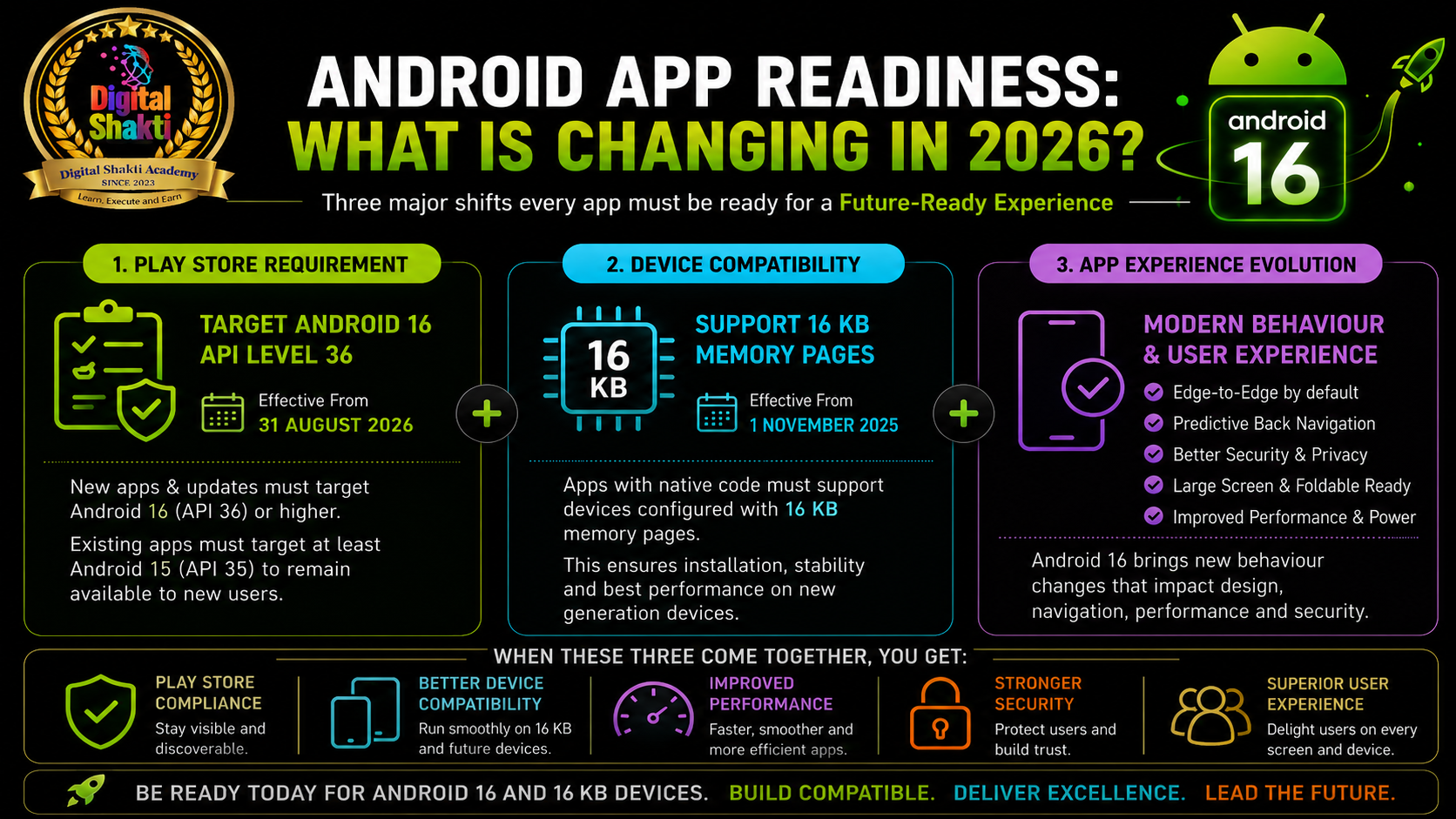
2. What Does 16 KB Page Size Mean?
Android manages memory in units called pages. Historically, Android devices generally used 4 KB pages. Android 15 introduced platform support for devices configured with 16 KB pages as manufacturers build devices with more physical memory. For a business owner, the practical meaning is simple: a 16 KB device organizes memory differently. If native libraries were built only for a 4 KB environment, the app may fail to install, launch or operate reliably. The requirement matters most when an app contains C or C++ code, NDK libraries, game engines, media-processing components, security or encryption SDKs, computer-vision libraries, or other prebuilt native files with the.so extension. Even when your own team wrote only Kotlin or Java, an embedded payment, analytics, advertising or media SDK may contain native code.
Apps written entirely in Java or Kotlin, including all their libraries and SDKs, already support 16 KB devices according to Google. They should still be tested in a verified 16 KB environment for unexpected regressions. Use Android Studio’s APK Analyzer to inspect the final APK or App Bundle. If the package contains a lib folder and .so files, those libraries require alignment checks. [2]
3. Is Compatibility Mode Enough?
Android 16 provides a compatibility mode that can allow some 4 KB-aligned apps to run on a device using 16 KB pages. The system may show a warning when the app first launches. This is a temporary safety net, not evidence of full readiness. Compatibility mode does not replace Google Play requirements, proper rebuilding, alignment verification or real-device testing. Google continues to recommend true 16 KB alignment for the best reliability, stability and performance. [2][4] Google’s initial tests found lower app-launch time under memory pressure, reduced power use during launch, faster camera starts and improved system boot time on 16 KB configurations. Actual results vary by device and app, but the direction is clear: 16 KB support prepares applications for the next generation of Android hardware. [2]4. The 12-Point Android App Readiness Checklist
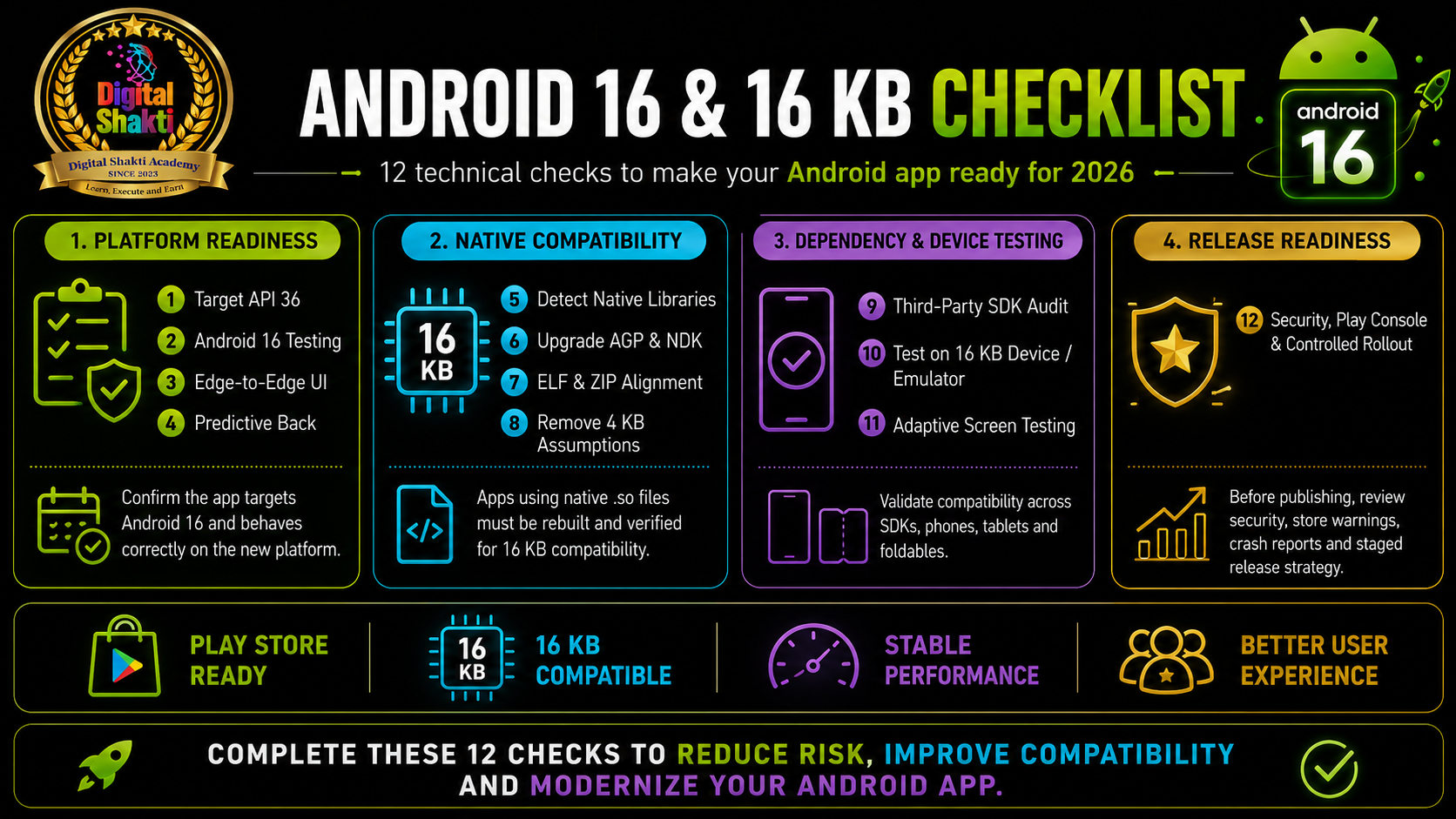
Use the following checks as a technical audit sequence. The most important principle is to inspect and test the final package—not only the source code.- Confirm the target API level: Review
targetSdkin the app’s Gradle configuration. For standard mobile apps submitted from 31 August 2026, the target should generally be API 36. Do not change it blindly; first review all behaviour changes that become active when targeting Android 16. [1][3] - Test on Android 16 before retargeting: Run the current production build on an Android 16 device or emulator before increasing
targetSdk. Test registration, login, OTP, payments, notifications, camera and file access, location, deep links, background work, sharing and account deletion. - Identify every native library: Open the final APK or App Bundle in APK Analyzer and inspect every ABI folder and
.sofile. Include framework-generated libraries and third-party SDKs. One outdated native dependency can make the whole application incompatible. - Upgrade build tools safely: Google recommends Android Gradle Plugin 8.5.1 or higher and NDK r28 or higher for standard 16 KB-compatible build configurations. NDK r28 aligns libraries for 16 KB by default. Upgrade in a separate development branch and complete regression testing. [2]
- Verify App Bundle and APK packaging: Native libraries need correct ELF segment alignment and correct ZIP alignment in the packaged APK. Inspect the App Bundle with
bundletooland confirm that it requests 16 KB page alignment. A result showing 4 KB alignment indicates more work is required. - Verify each native .so file: Use Android Studio checks or Google’s alignment tools to identify aligned and unaligned libraries. Verify the final APK with
zipalignusing 16 KB page alignment. Successful compilation alone does not prove that the packaged application is compliant. [2] - Remove hard-coded 4 KB assumptions: Search native code for
PAGE_SIZE, hard-coded4096values,mmapusage, page-aligned buffers and custom memory-allocation logic. Use runtime-aware methods such asgetpagesize()orsysconf(_SC_PAGESIZE). - Audit every third-party SDK: Review payments, analytics, advertisements, authentication, maps, notifications, video, security, customer-support and document-processing SDKs. Confirm that the exact versions used in the build support 16 KB pages.
- Test in a verified 16 KB environment: Use a supported physical device or 16 KB emulator image. Run
adb shell getconf PAGE_SIZEand confirm16384. Test installation, upgrades, starts, files, media, payments, camera, notifications, background tasks, crashes, battery and memory use. [2] - Prepare the interface for Android 16: Apps targeting API 36 cannot opt out of edge-to-edge on Android 16 devices. Predictive back is enabled by default, and legacy back handling may require migration. Test adaptive layouts on tablets, foldables and resizable windows. [3]
- Review security and platform behaviour: Audit intents, exported components, deep links, pending intents, authentication, file providers, permissions, background work, non-SDK APIs and sensitive-data storage. Security testing is a core release requirement. [3][4]
- Complete Play Console and release testing: Review Play Console warnings, upload the App Bundle, inspect generated APKs, test through internal or closed tracks, monitor crashes and ANRs, verify signing and data-safety information, and use a controlled rollout.
5. Priorities for Different App Types
| App Type | Primary Readiness Priorities |
|---|---|
| Native Kotlin / Java | API 36 behaviour testing, edge-to-edge, predictive back, dependency review and 16 KB environment testing. |
| Cross-Platform | Framework version, Android build tools, native plugins, generated .so files and platform-specific integrations. |
| Games / Media | Engine versions, rendering libraries, codecs, large assets, memory handling, ELF/ZIP alignment and performance. |
| Business / Enterprise | Authentication, APIs, background synchronization, databases, notifications, device management, security and privacy. |
6. Six Common Mistakes to Avoid
- The app opens, so it must be compatible: Compatibility mode can hide a genuine alignment problem.
- We checked only our own code: A third-party SDK can contain the incompatible native library.
- We tested only on an ordinary 4 KB device: That environment may never expose the issue.
- We upgraded the NDK but not the prebuilt dependencies: Both must be compatible.
- We changed targetSdk to 36 without testing behaviour changes: Navigation, layouts and permissions may break.
- Play Console accepted the build, so quality assurance is complete: Store acceptance does not prove every feature, screen size or customer journey works correctly.
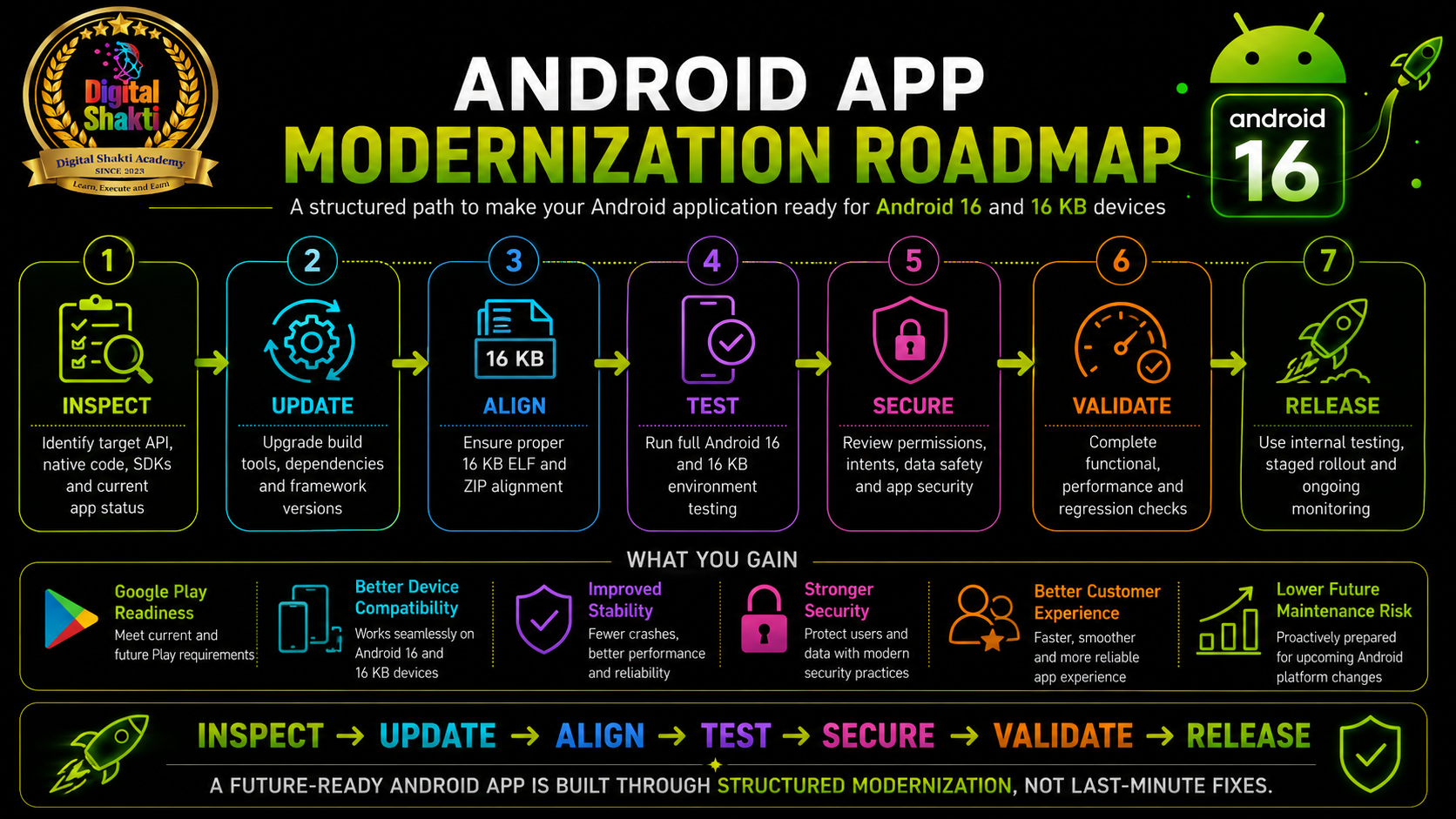
7. A Practical 14-Day Modernization Plan
Days 1–2 — Inventory: Confirm the target API, framework, SDKs, native libraries and Play Console warnings.
Days 3–5 — Update: Modernize build tools and dependencies, rebuild native libraries, remove 4 KB assumptions and correct packaging alignment.
Days 6–8 — Android 16 testing: Verify installation, updates, edge-to-edge, predictive back, permissions, intents and background work.
Days 9–10 — 16 KB testing: Confirm PAGE_SIZE is 16384, verify alignment and test every critical journey while monitoring crashes, memory and battery.
Days 11–12 — Device and UX testing: Test phones, tablets, foldables, different window sizes, accessibility and slow networks.
Days 13–14 — Release preparation: Upload to an internal track, inspect artifacts, test production upgrades, resolve warnings and plan a controlled rollout.
Conclusion
Android 16 readiness is not a single checkbox. A future-ready application combines a current target API, true 16 KB compatibility, updated dependencies, adaptive design, security review and realistic device testing. The first urgent question is whether the app contains native libraries and whether every one of them is correctly aligned. Do not wait until an important update is rejected or a new device exposes the problem. Inspect the application now, modernize it through a structured process and release it with evidence rather than assumptions.IS YOUR ANDROID APP READY FOR ANDROID 16 AND 16 KB DEVICES?
Get a structured review of target API level, native libraries, SDK compatibility, ELF and ZIP alignment, Android 16 behaviour, security and Google Play readiness.
REQUEST MY ANDROID APP READINESS AUDITNEXT STEPS
Download the Free Android 16 and 16 KB Checklist | Discuss Your Mobile App Development Project
Frequently Asked Questions
1. Is 16 KB support required only for Android 16?
No. Android 15 introduced 16 KB page-size support, and Google Play’s compatibility requirement applies to new apps and updates targeting Android 15 or higher. Android 16 adds compatibility mode for some older 4 KB-aligned apps. [2][4]
2. Does a Kotlin app automatically support 16 KB devices?
Only when the app and all included libraries and SDKs contain no native code. It should still be tested in a 16 KB environment. [2]
3. How can I tell whether the app contains native code?
Open the APK or App Bundle in Android Studio’s APK Analyzer. The presence of .so files inside lib folders indicates native libraries.
4. Is Android 16 compatibility mode enough?
No. It may help some apps run, but proper 16 KB alignment remains the recommended solution for reliability and stability. [2][4]
5. Which NDK version provides 16 KB alignment by default?
NDK r28 and later compile native libraries with 16 KB ELF alignment by default in standard configurations. [2]
6. How do I confirm a 16 KB test environment?
Run adb shell getconf PAGE_SIZE. A verified 16 KB environment returns 16384. [2]
Official References
- Google Play target API level requirements
- Support 16 KB page sizes
- Android 16 behaviour changes for apps targeting API 36
- Android 16 behaviour changes affecting all apps
Editorial note: Requirements can change. Recheck the linked official Android documentation immediately before publishing or submitting an app update.