Your Website Gets Traffic but No Leads: 12 Conversion Leaks to Fix in 2026
Your website receives visitors from Google, social media, advertisements or referrals—but they do not enquire, register, book a consultation or purchase.
This can create the impression that digital marketing is not working. In reality, traffic is only the beginning. A visitor becomes a lead when the page makes the value clear, builds sufficient trust, presents a relevant offer and makes the next step easy.
Every visitor silently asks five questions: Is this relevant to me? Do I understand the offer? Can I trust the business? What should I do next? Is that action easy and worthwhile? When the page fails to answer any of them, conversion leaks begin.
FREE WEBSITE CONVERSION CHECK
Use the 12-point Website Conversion Leak Scorecard to review your message, trust, offer, mobile experience, form and follow-up.
Traffic Is Not the Same as Conversion
A practical lead-generation model is:
Relevant Traffic × Clear Message × Strong Trust × Valuable Offer × Easy Action × Timely Follow-Up = Lead Opportunity
Conversion is not only a design issue. It depends on the complete relationship between visitor intention, page message, credibility, offer relevance, user experience, CTA, form, follow-up and measurement.
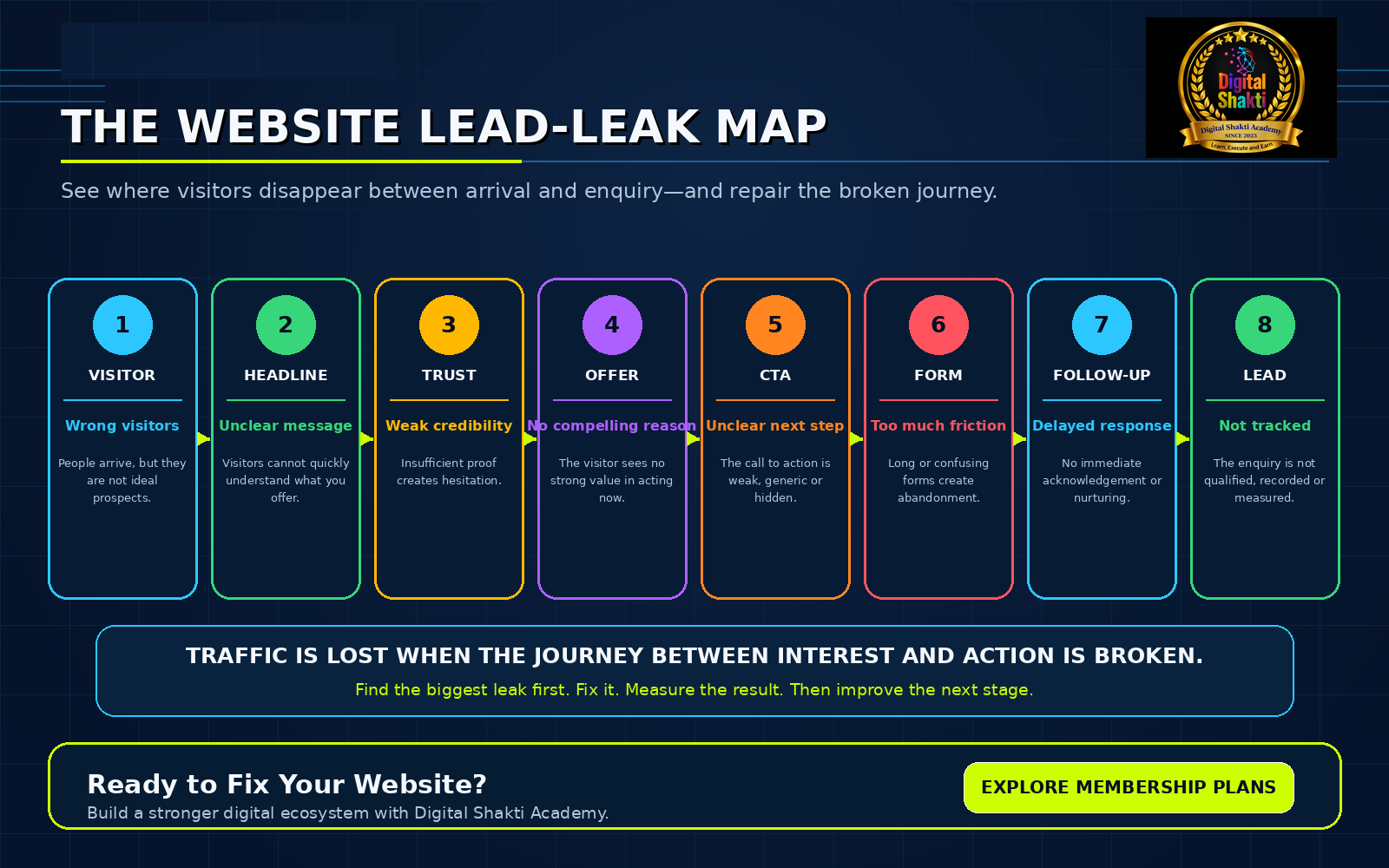
The 12 Conversion Leaks
1. You Are Attracting the Wrong Visitors
More traffic does not always mean better traffic. Broad keywords, poorly targeted advertisements or viral content can attract people who do not need your service, lack buying intent or expect only free information.
ak Map” width=”300″ height=”188″ class=”alignnone size-medium wp-image-3524″ />#2563eb;”>How to fix it:
- Match each traffic source with a specific customer problem.
- Create pages for defined audiences and service intentions.
- Review which sources produce qualified enquiries, not only clicks.
2. Your First Screen Does Not Explain the Value
The first visible screen should tell the visitor what you provide, who it is for, which result it creates and what to do next. A generic “Welcome to Our Company” headline wastes the most valuable part of the page.
How to fix it:
- Use the formula: Specific Service + Valuable Outcome + Intended Audience.
- Place one clear CTA near the main promise.
- Remove introductory text that delays the answer.
3. Your CTA Is Weak or Unclear
Buttons such as Submit, Click Here and Know More do not explain the benefit. Multiple competing CTAs also create hesitation.
How to fix it:
- Use outcome-focused wording such as Request My Website Audit or Discuss My Project.
- Keep one primary CTA consistent across the page.
- Match the CTA to the visitor’s current level of commitment.
4. You Have No Compelling Entry Offer
Many visitors are interested but not ready to purchase immediately. “Contact us for more information” offers little value and requires too much commitment.
How to fix it:
- Offer a checklist, audit, calculator, webinar, discovery call or planning worksheet.
- Solve one specific problem and deliver one quick result.
- Collect only the details required for the next conversation.
5. The Advertisement and Landing Page Do Not Match
A visitor who clicks “Get a Free Website Audit” should not land on a general homepage and search for the promised offer. The advertisement, landing page, CTA, thank-you message and follow-up should feel like one connected conversation.
How to fix it:
- Repeat the original promise in the landing-page headline.
- Keep the audience, visual theme and CTA consistent.
- Send a confirmation that explains the next step.
6. The Website Is Slow or Unstable
Performance problems can prevent visitors from seeing the value or completing an action. The current good Core Web Vitals thresholds are LCP at 2.5 seconds or less, INP at 200 milliseconds or less and CLS at 0.1 or less, measured at the 75th percentile. [1]
How to fix it:
- Compress large images and use modern formats.
- Remove unnecessary plugins, scripts and heavy effects.
- Improve caching, hosting and mobile performance.
7. The Mobile Experience Creates Friction
A page can look excellent on a laptop but fail on a phone. Common problems include unreadable text, difficult tap targets, overlapping WhatsApp buttons, intrusive pop-ups and forms that extend beyond the screen.
How to fix it:
- Test the complete enquiry journey on a real phone.
- Confirm the offer, CTA, form and confirmation are easy to use.
- Use small banners rather than content-blocking interstitials. Google warns that intrusive overlays can frustrate users and make content harder to understand. [2]
8. The Website Does Not Build Enough Trust
Visitors cannot physically inspect your office, team or service quality. The website must reduce uncertainty with evidence rather than claims.
How to fix it:
- Show genuine founder, mentor or team profiles.
- Add real testimonials, case studies and project examples.
- Display contact details, policies, security and a transparent process.
9. The Page Has Too Many Distractions
Numerous menus, pop-ups, unrelated services, autoplay videos, social feeds and competing buttons give the visitor many ways to leave without completing the intended action.
How to fix it:
- Apply the one-page, one-purpose rule.
- A webinar page should generate registrations.
- A service page should generate project discussions.
10. The Form Is Too Long or Confusing
A first-contact form should begin a conversation, not conduct a full investigation. W3C guidance recommends simple, short forms that request only necessary information, with visible labels and clear instructions. [3]
How to fix it:
- Start with name, mobile/WhatsApp, email, service and brief requirement.
- Mark required fields and explain expected formats.
- Show understandable errors and preserve entered information.
11. There Is No Immediate Follow-Up System
A submission is the beginning of the sales conversation. Without a thank-you message, WhatsApp or email acknowledgement, CRM entry, owner assignment and scheduled follow-up, valuable leads quickly become cold.
How to fix it:
- Acknowledge the enquiry immediately.
- Record the lead and assign responsibility.
- Move the person toward qualification, consultation and proposal.
12. You Are Not Measuring the Conversion Journey
Page views do not reveal where visitors disappear. Google Analytics enhanced measurement can collect form_start and form_submit events, which can be compared to identify form abandonment. [4] Microsoft Clarity heatmaps can show dead clicks, rage clicks and scroll behaviour. [5]
How to fix it:
- Track CTA clicks, form starts, submissions, WhatsApp and call clicks.
- Measure qualified leads, consultations and final sales.
- Repair the weakest stage before redesigning the entire website.
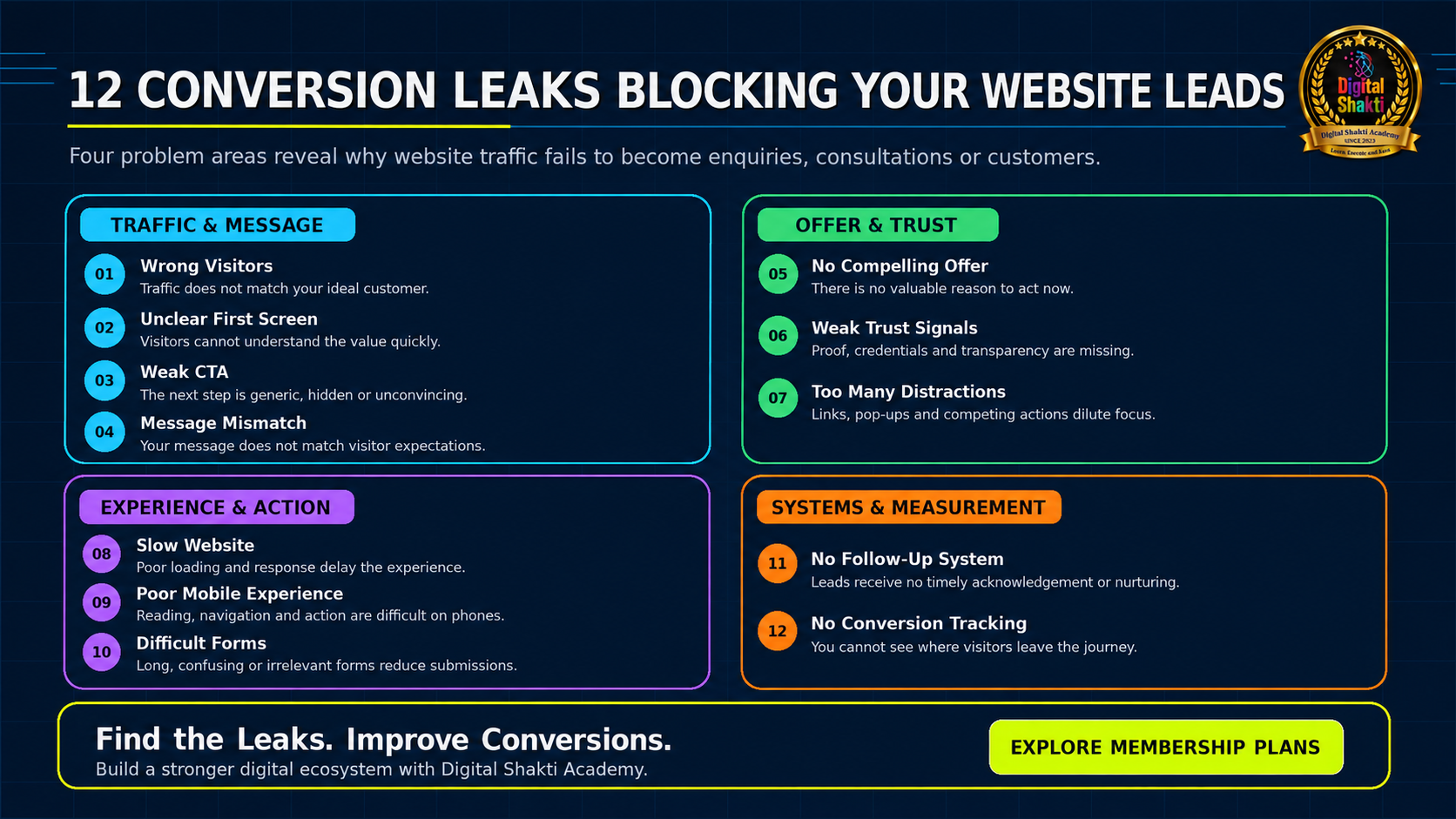
Conversion Leak Diagnostic Table
| Conversion Leak | Diagnostic Question |
|---|---|
| Wrong visitors | Are we attracting the right audience with genuine intent? |
| Unclear first screen | Can a visitor understand the value within seconds? |
| Weak CTA | Is the next step specific, visible and beneficial? |
| No compelling offer | Is there a low-risk reason to act now? |
| Message mismatch | Does the page fulfil the advertisement or search promise? |
| Slow performance | Does the page become useful and responsive quickly? |
| Mobile friction | Can a phone user understand and act easily? |
| Weak trust | Does the page reduce uncertainty with real evidence? |
| Too many distractions | Does the page support one primary goal? |
| Difficult form | Is the first enquiry simple and accessible? |
| No follow-up | What happens immediately after submission? |
| No measurement | Can we identify the exact stage where visitors leave? |
A Practical 7-Day Website Conversion Repair Plan
| Day | Action |
|---|---|
| Day 1 — Review Traffic | Identify where visitors come from, which pages they enter, what intention they have and which sources produce qualified leads. |
| Day 2 — Rewrite First Screen | Improve the headline, sub-headline, primary benefit, CTA and supporting trust statement. |
| Day 3 — Strengthen Trust | Add or improve the founder profile, testimonials, case studies, contact information, policies and process explanation. |
| Day 4 — Simplify the Offer | Create one useful first step such as a checklist, audit, consultation, webinar or planning worksheet. |
| Day 5 — Improve the Form | Remove unnecessary fields, use clear labels and test the complete submission process on a real mobile device. |
| Day 6 — Connect Follow-Up | Set up a thank-you message, email or WhatsApp acknowledgement, CRM record and team notification. |
| Day 7 — Measure the Funnel | Track CTA clicks, form starts, submissions, qualified leads and consultation bookings, then improve the weakest stage. |
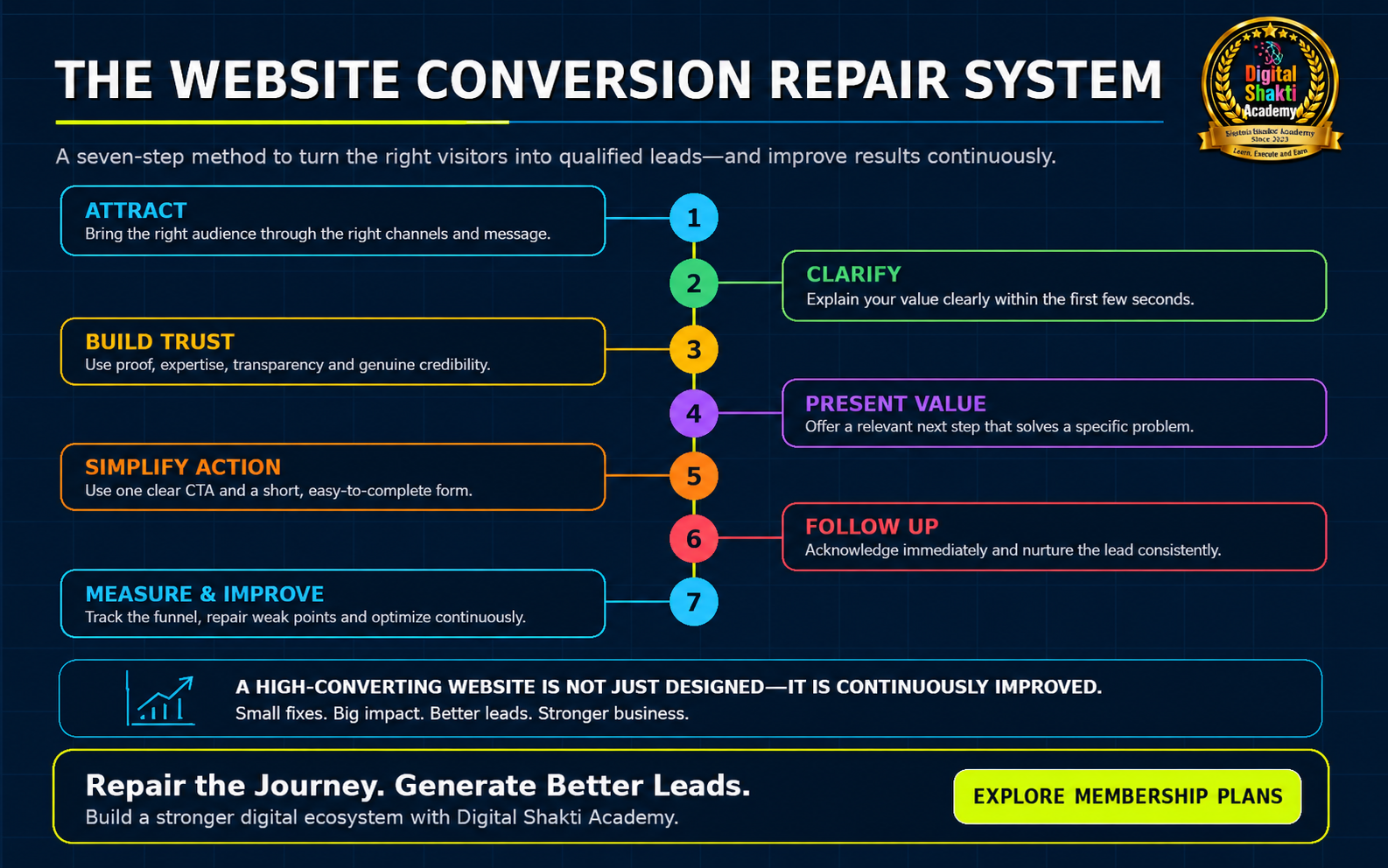
Twelve-Point Website Conversion Checklist
- The target audience and traffic intent are clearly defined.
- The headline explains the benefit and intended audience.
- The main offer is visible without unnecessary searching.
- One primary CTA is used consistently.
- Trust signals are genuine, specific and easy to verify.
- The page works well on real mobile devices.
- The form is short, labelled and easy to complete.
- The page loads, responds and remains visually stable.
- The advertisement and landing-page message match.
- The visitor receives an immediate confirmation.
- The lead enters a clear follow-up process.
- Important conversion events and business outcomes are measured.
Conclusion
When a website gets traffic but produces no leads, the answer is not always more advertising or a complete redesign. The largest problem may be a broken step inside the existing visitor journey.
Visitors become leads when the right message reaches the right person, builds sufficient trust, presents a relevant offer and makes action easy.
Find the biggest leak, repair it, measure the result and then improve the next stage. A high-converting website is not merely designed once—it is continuously improved.
IS YOUR WEBSITE LOSING POTENTIAL CUSTOMERS?
Request a structured review of the first-screen message, CTA, speed, mobile experience, trust signals, form, follow-up and conversion tracking.
NEXT STEPS
Download the Free Website Conversion Leak Scorecard or register for the Free Digital CEO Masterclass.
Frequently Asked Questions
1. Why does my website receive traffic but no enquiries?
The common causes are poor traffic quality, an unclear value proposition, weak trust, a low-value offer, form friction, a weak CTA or the absence of follow-up and measurement.
2. Should I completely redesign the website?
Not immediately. First use analytics, form events, heatmaps and session recordings to identify the weakest stage. A focused improvement can outperform a complete redesign.
3. How many fields should a lead form contain?
Only those needed to begin the next step. W3C guidance recommends simple and short forms and warns that excessive or irrelevant requests increase abandonment. [3]
4. What performance targets should I use?
For good Core Web Vitals, aim for LCP of 2.5 seconds or less, INP of 200 milliseconds or less and CLS of 0.1 or less at the 75th percentile. [1]
5. How can I identify visitor frustration?
Use analytics with heatmaps and session recordings. Microsoft Clarity can surface dead clicks, rage clicks and scrolling patterns. [5]
6. How can I measure form abandonment?
Google Analytics enhanced measurement can collect form_start and form_submit events. Compare starts and successful submissions, and configure custom tracking when a modern AJAX form is not detected reliably. [4]
Official References
- Core Web Vitals thresholds — web.dev
- Avoid intrusive interstitials and dialogs — Google Search Central
- Forms Tutorial and Labels — W3C Web Accessibility Initiative
- Enhanced measurement events — Google Analytics Help
- Heatmaps overview — Microsoft Clarity
Editorial note: Digital platforms and product guidance can change. Recheck the linked official sources before publishing or implementing major changes.